

Yesterday we reported that an international group of hackers claim they have breached Apple’s iCloud user database and stolen 300 million usernames and passwords. The group has threatened to initiate a widespread factory reset on April 7th, 2017, potentially wiping out data on tens of millions of iPhones and iCloud accounts should Apple fail to pay a ransom.
But that breach by nefarious hackers, while serious, is nothing compared to what your trusted operating system provider may be doing on your personal computer.
According to a recent report, if you are a Windows 10 user then every single keystroke you have ever typed on your computer may have been logged and sent to Microsoft.
You know those nagging questions during the installation process that ask you whether or not you want to “help” improve Windows by sending data to Microsoft? If you happened to answer “yes” to one of these questions, or if you went with the Microsoft default installation, there is a real possibility that everything you have done on your computer from the get-go, including sending “secure” messages (because the keyboard logger captures your keystrokes before they appear in your secure messaging app), is now a part of a massive user database somewhere.
There’s been heaps of controversy associated with Microsoft’s latest operating system Windows 10 since it was launched, but the latest issue takes the cake – apparently Windows has been quietly logging every single keystroke users make on their keyboards from the beginning. Even better, that data is being constantly sent to Microsoft’s servers on a regular basis.
Via IB Times
It’s been reported that Microsoft has been using the data to improve artificial intelligence writing and grammar software, but it’s not clear what else they are doing with it.
If you are OK with sharing your personal messages, usernames and passwords with Microsoft for the betterment of the Windows universe, then there is nothing else you need to do at this time.
But if you are concerned about your personal privacy, there are two ways to avoid having your computer spied on using this keylogger method.
Choose A Custom Installation
When installing Windows 10 for the first time you’ll want to select a ‘Custom Install’. This will allow you to choose what you do or do not want activated. To be safe, select ‘no’ for all options related to sending information or data to Microsoft or third-parties.
Update Your Privacy Settings
There is a simple way to identify whether or not your typing activities are being logged.
Simply click on your Windows 10 Start Menu. From there, go to Settings (or the gear icon) -> Privacy -> General
You’ll want to turn off the option that says, “Send Microsoft info about how I write to help us improve typing and writing in the future.”
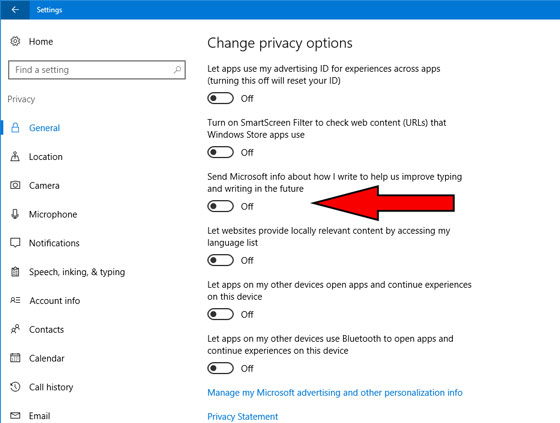
Once moved to the ‘Off’ position, Microsoft keyword logging should no longer be a problem.
But even though Microsoft will no longer be accessing your data, keep in mind that recent leaked documents reveal most devices have been compromised by intelligence services, meaning that not only can they see what you are typing to friends, family and business colleagues, but they can remotely monitor your voice and video communications in real-time without you even knowing its happening, including when you think your computer is turned off.
Related:
Conspiracy Theorists Vindicated: CIA Uses “Hacking, Trojans, Viruses, And Weaponized Malware”
Widespread Surveillance State: “At This Rate We’ll All Be In Cages… Either Electronic Or Literal”




0 Comments